How to (gracefully) exit a Storj node on a Synology NAS?
After last week's shocking clickbait (I got fired), I thought I'd write about something relaxing this week 😅
I haven't picked up goat herding yet (and based on the TikToks I've seen, it isn't THAT relaxing, either), so instead I'll share how to stop a Storj storage node running in Container Manager on a Synology NAS without losing your held amount or tanking your node's reputation.
Why? Because the Storj documentation is a bit light on the details, and I had to figure it out myself.
I'm quitting the Storj network since the tiny amount of money you make is nowhere near worth the electricity and hardware cost.
Background
What is Storj?
Storj is a decentralized cloud storage network. You can run a Storj storage node on your own hardware, and when people use the network to store their data, you get paid for the storage space you provide.
Think of it as OneDrive, but decentralized.
Exiting
If you're winding down a Storj storage node, you don't just yank the plug and walk away. Do that and you forfeit your held amount and tank the node's reputation on the way out. Graceful exit is the polite version: you tell each satellite you're leaving, they confirm, and you get the escrow back.
When the node runs in Container Manager on a Synology DiskStation, the storagenode binary lives inside the container at /app/storagenode, with the config and identity mounted at /app/config and /app/identity. You don't need SSH for this. Container Manager can open a terminal straight into the container from the DSM web interface, and it can launch that terminal with a command of your choosing.
Opening a terminal into the container
Log in to DSM in your browser and open Container Manager. Go to the Container tab, click your node's container to select it (the default name is storagenode), and open the Container's details.
On the top right, click "Action" to access Terminal.
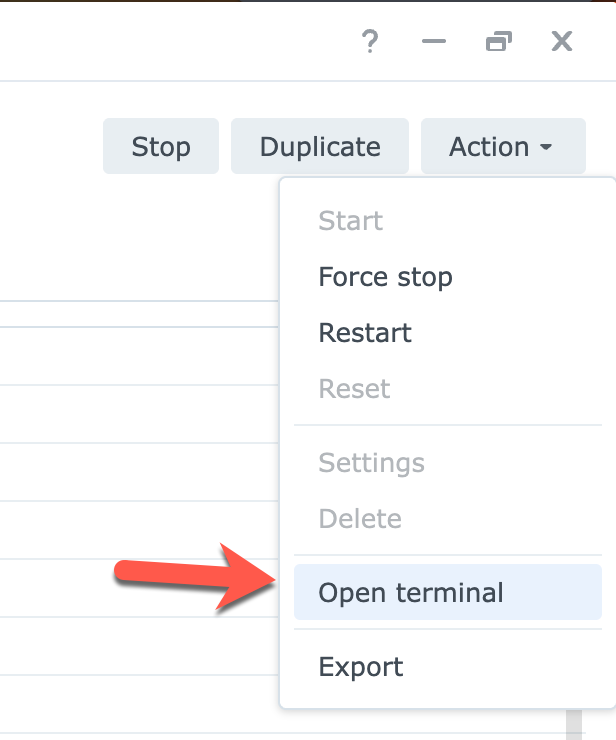
This is where the useful stuff lives. Click Create, and instead of the default bash shell, pick "Launch with command".
That lets you type the exact command to run inside the container, and it drops you into an interactive session with that command already running.
Starting the graceful exit
In the Launch with command box, enter the exit command with its config and identity paths:
/app/storagenode exit-satellite --config-dir /app/config --identity-dir /app/identity
Somewhat like this:
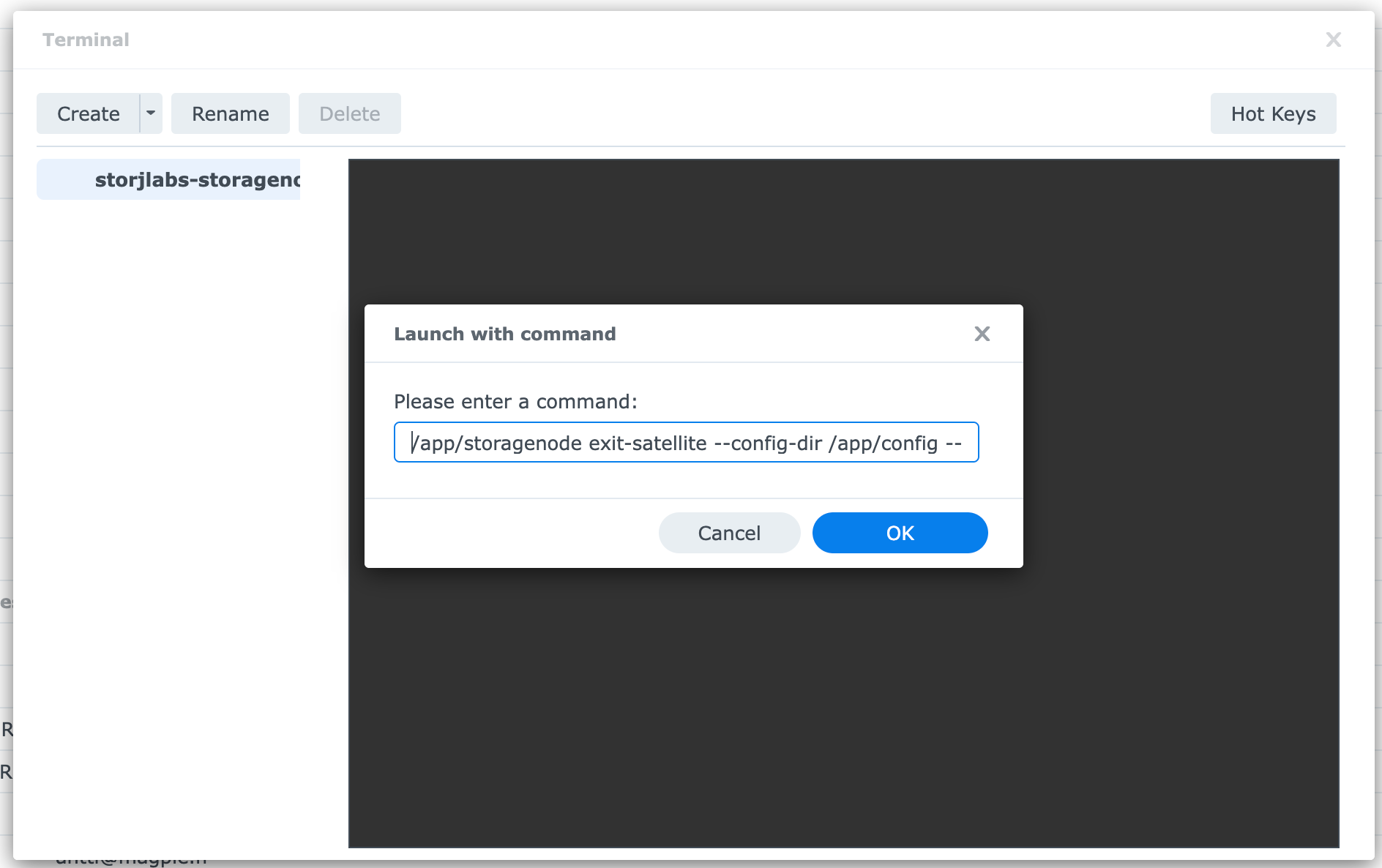
The terminal opens with a warning and a confirmation prompt:
By starting a graceful exit from a satellite, you will no longer receive new uploads from that satellite.
This action can not be undone.
Are you sure you want to continue? [y/n]
Type y, and it lists the satellites your node knows about along with how much data you're storing for each:
Domain Name                  Node ID                                              Space Used
saltlake.tardigrade.io:7777  1234567890P5RSnCqKV1eLf6N9wtk4EAtmN5DpSxcs8EjT69tGE   0 B
ap1.storj.io:7777            1234567890ZVcEU84Ticf2L1ntiuUimbWgfATz21tuvgk3vzoA6  0 B
us1.storj.io:7777            1234567890kEsWESU9QMRseFhdxYxKicsiFmxrsLZHeLUtdps3S  388.36 GB
eu1.storj.io:7777            1234567890puEKMUNUqkaTLGzwY9G24tbiigLiXpmZWKwmcNDDs  0 B
(Sure, laugh at my pitiful 388 GB of data. I know, I know. But it was fun while it lasted.)
Then it asks which ones you want to leave. Paste a space-delimited list of the domain names, or all of them if you're shutting the node down for good:
Please enter a space delimited list of satellite domain names you would like to gracefully exit. Press enter to continue:
saltlake.tardigrade.io:7777 ap1.storj.io:7777 us1.storj.io:7777 eu1.storj.io:7777
It confirms the exit has started, with everything sitting at 0% because nothing has transferred yet:
Domain Name                  Node ID                                              Percent Complete  Successful  Completion Receipt
saltlake.tardigrade.io:7777  1234567890P5RSnCqKV1eLf6N9wtk4EAtmN5DpSxcs8EjT69tGE   0.00%             N           N/A
ap1.storj.io:7777            1234567890ZVcEU84Ticf2L1ntiuUimbWgfATz21tuvgk3vzoA6  0.00%             N           N/A
us1.storj.io:7777            1234567890kEsWESU9QMRseFhdxYxKicsiFmxrsLZHeLUtdps3S  0.00%             N           N/A
eu1.storj.io:7777            1234567890puEKMUNUqkaTLGzwY9G24tbiigLiXpmZWKwmcNDDs  0.00%             N           N/A
Checking on progress
The exit runs in the background while the node keeps running, so leave the container up. To see where things stand, open the Terminal tab again, click Create, choose Launch with command, and run the status command:
/app/storagenode exit-status --config-dir /app/config --identity-dir /app/identity
You'll get the same table back, with the percentages creeping up over time:
Domain Name                  Node ID                                              Percent Complete  Successful  Completion Receipt
saltlake.tardigrade.io:7777  1234567890P5RSnCqKV1eLf6N9wtk4EAtmN5DpSxcs8EjT69tGE   0.00%             N           N/A
ap1.storj.io:7777            1234567890ZVcEU84Ticf2L1ntiuUimbWgfATz21tuvgk3vzoA6  0.00%             N           N/A
us1.storj.io:7777            1234567890kEsWESU9QMRseFhdxYxKicsiFmxrsLZHeLUtdps3S  0.00%             N           N/A
eu1.storj.io:7777            1234567890puEKMUNUqkaTLGzwY9G24tbiigLiXpmZWKwmcNDDs  0.00%             N           N/A
Once a satellite hits 100% with Y under Successful and a real Completion Receipt, that satellite is done and your held amount for it is on the way back. When every satellite shows a receipt, stop and remove the container and reclaim the disk space.
A couple of gotchas
Keep the container running for the whole exit (up to 30 days). If the node goes offline too much during the process, the exit can fail and you lose the held amount anyway, which defeats the entire point. Don't stop it in Container Manager until every satellite shows a receipt.
Closing the Terminal tab in your browser is fine once the exit has started, because the exit itself is tracked by the node, not by that terminal session. The Launch with command terminal is just how you send the instruction and read the status back.
And double-check the container name and the mount paths before you run anything. If you created the node through the Container Manager wizard, the /app/config and /app/identity paths should match the defaults from the official image, but it's worth a look.
Last thoughts
Storj was kind of a fun experiment, but the economics just don't work out for me. I hope this guide helps someone else exit gracefully without losing their held amount or reputation.
Comments
No comments yet.