A working service can stop answering overnight when the IP beneath your AKS ingress changes — and when DNS records or firewall rules depend on that address, the fallout can be immediate and painful!
This article explains why AKS sometimes changes public IPs, how to tell whether your cluster uses a single address or separate inbound/outbound addresses, and practical steps to prevent surprises or recover quickly when the IP does change.
Background
Let's set the scene: You have an AKS cluster running in Azure, with a public IP address assigned to its ingress controller. Everything is working fine, until one day, you notice that the IP address has changed.
This can be a major issue if you have DNS records or firewall rules that depend on the static IP address.
And guess who happens to be involved in running a SaaS platform for a few million end users, where some customers might have DNS recoirds or firewall rules pointing to the AKS ingress IP address?
Well, there's a reason why I am writing this blog post.
But to soften the blow a little bit, the actual adults running the REAL production systems already handled this as, believe it or not, they have a process for managing the IP addresses AKS uses and updating DNS and firewall rules accordingly.
But when there's a random buffoon (like yours truly) running a few clusters for... Let's say, "very special" use cases, with very special customers, well... Stuff happens.
Bad stuff!
Problem
AKS doesn't actually guarantee that the public IP address assigned to the ingress controller will remain the same over time.
Unless you specifically configure a static public IP address and associate it with the ingress controller, AKS may change the IP address during certain operations - actually, a lot of operations - and what's pretty important to understand is that there's a separate public IP address resource created in Azure for the inbound traffic... And possibly a separate one for outbound traffic.
And while the inbound IP address is useful for DNS rules, if you (or a customer) needs to have an opening in their firewall for traffic coming from the AKS cluster, you need to know the outbound IP address as well.
And in some cases, these 2 addresses are the same.
But in others, they are not.
When does AKS only have one IP address?
Even without a static IP address assigned, AKS may retain the same public IP address for a long time. And you will only have one public IP address (for both inbound and outbound traffic) when:
- You are using a basic load balancer (instead of standard)
- You have not configured any outbound rules or NAT gateways
In this case, the same public IP address is used for both inbound and outbound traffic.
When does AKS have separate IP addresses?
AKS will have separate public IP addresses for inbound and outbound traffic when:
- You are using a standard load balancer
- You have configured outbound rules or NAT gateways
In this case, the inbound IP address is used for traffic coming into the cluster, while the outbound IP address is used for traffic going out of the cluster.
Reason
In my particular case, the AKS cluster was configured to use a basic load balancer without any outbound rules or NAT gateways. This means that the same public IP address was used for both inbound and outbound traffic.
But when we upgradded the load balancer from basic to standard, AKS created a new public IP address for outbound traffic, while the inbound IP address remained the same.
And for this particular case (no static IP, upgrading from basic to standard load balancer) there is no obvious way back and the trick is just knowing what the new outbound IP address is, and updating any firewall rules accordingly.
Solution
Now, the "real" solution is to always use static public IP addresses for both inbound and outbound traffic. Or at least for whatever resources actually requiring consistent IP addresses.
This way, you can ensure that the IP addresses remain the same over time, even if you perform operations that would normally cause AKS to change the IP addresses.
But the world is messier than that, and sometimes you just have to deal with the situation as it is.
So, here's how you can figure out what the current outbound IP address is for your AKS cluster.
Azure Portal
- Navigate to the Azure Portal and go to your AKS cluster.
- Under "Settings", select "Networking".
- Navigate under "Virtual network integration" to find the, well, Virtual network. Click it.
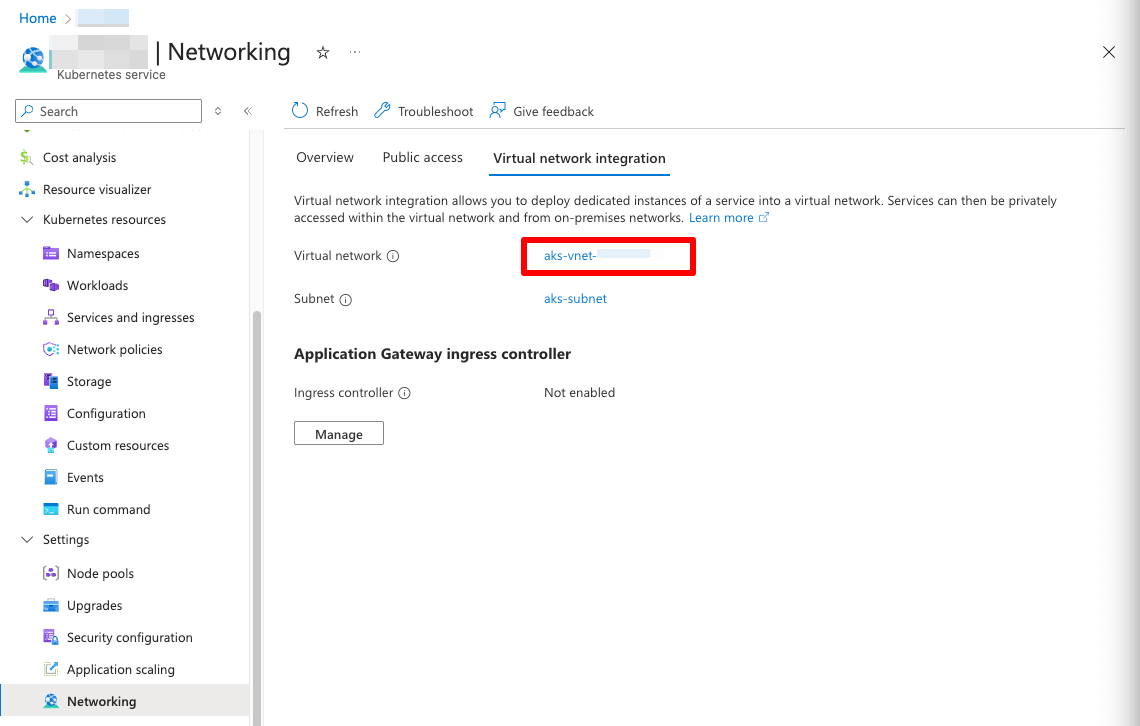
AKS Networking on Azure Portal - Click "Resource group" link to open the resource group containing the network resources for your AKS cluster.
- If you have just one public IP address, it should be listed there. If you have two, the outbound one should NOT start with "kubernetes-". If you have more, well, follow the next steps to find out the correct one.
How to find the correct outbound IP address from the built-in RG?
To make sure you find the correct outbound IP address, you can follow these steps:
- Click "kubernetes" Load Balancer in the resource group.
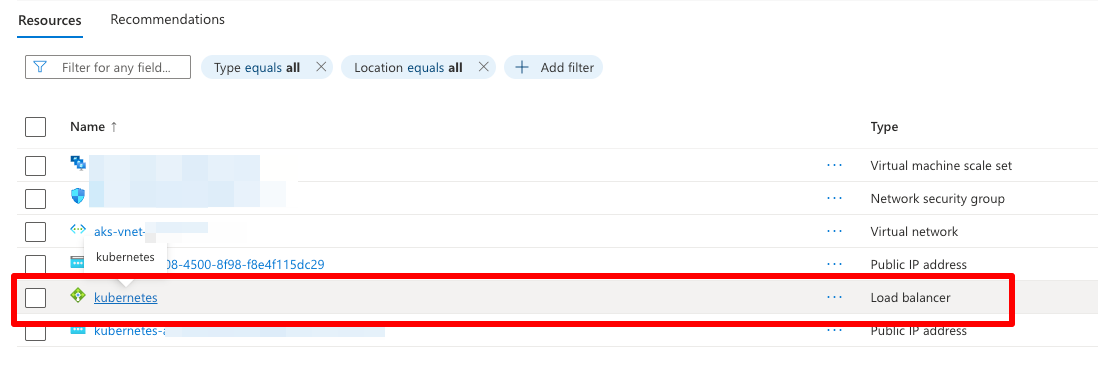
AKS Load Balancer configuration on Azure Portal - Navigate to outbound rules.

AKS Load Balancer's outbound rules on Azure Portal - Open the setting for your rule and you'll find the right IP address listed there.
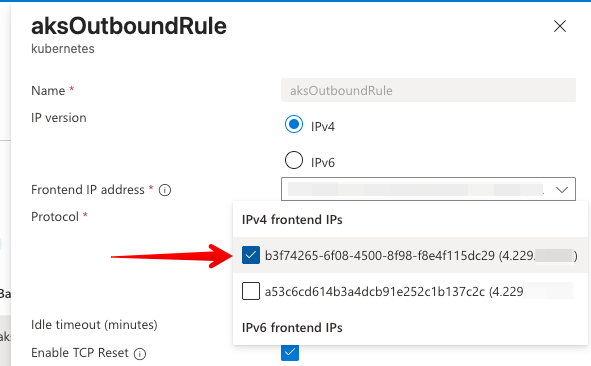
List outbound IP address(es) on AKS configuration on Azure Portal
Or if you just have a couple of Public IP addresses
Alternatively, you can list all public IP addresses in your subscription (you can't filter by resource group, because AKS will generate the outbound IP in a different resource group than the cluster itself), and then filter the results by the name of your AKS cluster:
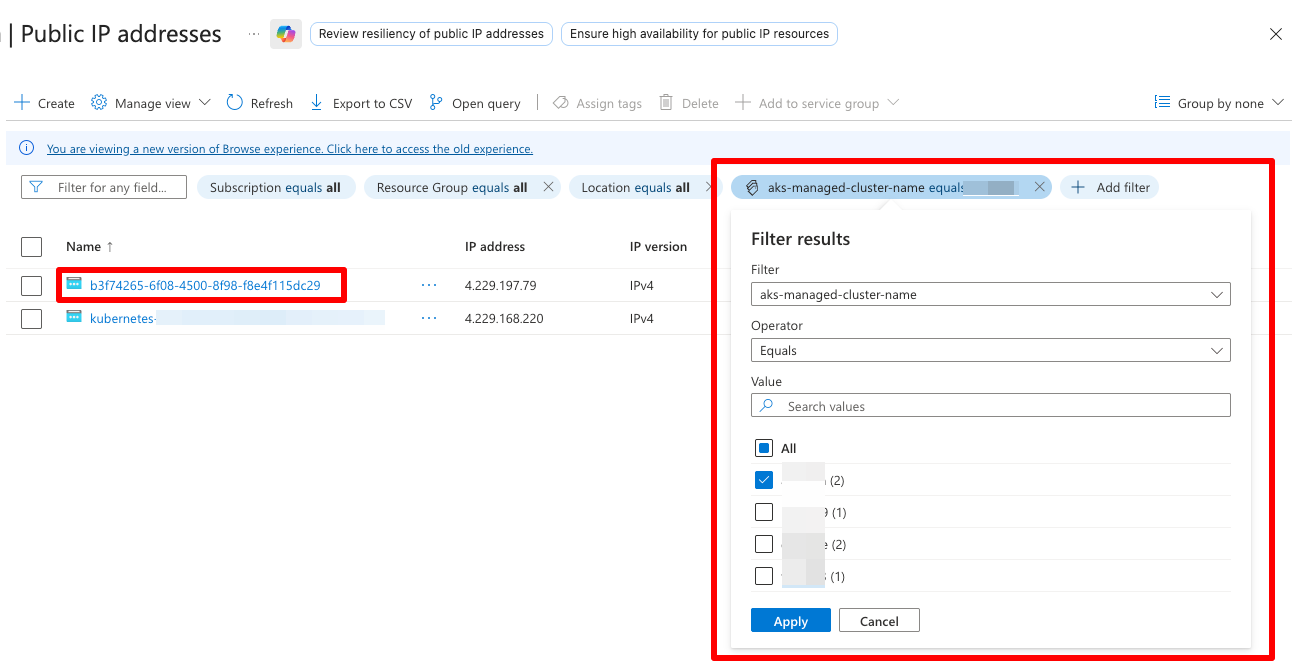
The correct outbound IP address should be listed there, NOT starting with "kubernetes-". If you have just 2 IP addresses, that is :)
Using Azure CLI
You can also use the Azure CLI to find the outbound IP address for your AKS cluster. Here's how:
- First, log in :)
az login
- Next, you'll need the cluster and resource group names - replace
<cluster>and<rg>with your actual cluster and resource group names.
Where:az network public-ip show --ids $(az aks show --resource-group <rg> --name <cluster> --query "networkProfile.loadBalancerProfile.effectiveOutboundIPs[].id" -o tsv) --query "ipAddress" -o tsv- You ask AKS which Public IP resource(s) it actually uses.
- Feed that ID straight into az network public-ip show.
- Extract the only thing you care about: the IP address.
- You should get back the actual outbound IP address(es) of your AKS cluster.
Conclusion
In summary, if you can't use static IP addresses for whatever reason, it's a good idea to be prepared for AKS changing the IP addresses - even seemingly at random.
Maybe I, I mean, YOU should even script the process... To actually always get the newest outbound IP address and update any firewall rules or DNS records accordingly...
Anyway, happy scripting! Or pointing-and-clicking, if you like Azure Portal better :)
Comments
No comments yet.