How to use Graph Subscriptions to monitor changes on a SharePoint site?
In this article, I'll show you how to get notified by Graph API about the latest changes like file updates in your SharePoint document library.
This is a common scenario for many organizations that use SharePoint as their primary document management system, and it can be really useful to have near real-time notifications about changes in the document library without having to constantly poll the API for updates (although with delta query, that's also viable - maybe worth looking into in another article!)
Background
Recently, I needed to refresh my memory on how to track changes in SharePoint using Microsoft Graph. For this very purpose, Graph API provides a feature called "Change Notifications" (also known as webhooks) that allows you to subscribe to changes in various resources, including SharePoint document libraries.
In the Graph API lingo, you'd create a subscription to the "drive/root" resource of your SharePoint site, and then whenever there's a change in that document library (like a file being added, modified, renamed or deleted), Microsoft Graph will send a notification to your specified endpoint.
This isn't perfect, for multiple reasons - as I'll explain below. But it IS a viable option if you want to get near real-time notifications about changes in your SharePoint document library without having to constantly poll the API for updates. And it's also a great way to learn about Graph API and webhooks in general!
Solution
So what do we need for the solution? Let's take a look!
1. Public endpoint
We'll need to start by actually having a public endpoint that can receive the notifications from Microsoft Graph. This can be done using various technologies - but in this particular case, I'll be using Azure Functions with an HTTP trigger, as it's a quick and easy way to set up a public endpoint without having to worry about hosting or infrastructure.
This endpoint needs to be able to handle POST requests, as that's how Microsoft Graph will send the notifications. When you create a subscription, you'll specify the URL of this endpoint as the "notificationUrl" in the subscription request.
A super basic sample of the Azure Function code to handle the notifications might look something like this:
[Function("HandleNotification")]
public async Task<HttpResponseData> RunAsync(
    [HttpTrigger(AuthorizationLevel.Anonymous, "post", Route = "notifications")] HttpRequestData req)
{
    _logger.LogInformation("HandleNotification function triggered.");

    var query = System.Web.HttpUtility.ParseQueryString(req.Url.Query);
    var validationToken = query["validationToken"];

    if (!string.IsNullOrEmpty(validationToken))
    {
        _logger.LogInformation("Echoing validationToken back to Graph.");

        var coderesponse = req.CreateResponse(HttpStatusCode.OK);
        coderesponse.Headers.Add("Content-Type", "text/plain; charset=utf-8");
        coderesponse.WriteString(validationToken);

        return coderesponse;
    }

    string body;
    using (var reader = new StreamReader(req.Body))
    {
        body = await reader.ReadToEndAsync();
    }

    await HandleNotifications(body);

    var response = req.CreateResponse(HttpStatusCode.Accepted);
    return response;
}
Obviously, you might want to have more error handling and you'll need to parse the actual notifications from the body of the request - but this should be enough to get you started with the validation process and receiving notifications from Microsoft Graph.
Practical setup tips
In case it's not obvious - you need to have this endpoint publicly accessible on the internet for Microsoft Graph to be able to send notifications to it.
If you're developing locally, you can use tools Dev Tunnels or ngrok to expose your local development environment to the internet temporarily. Just make sure to update the "notificationUrl" in your subscription request to point to the correct URL provided by these tools - and remember to make your Dev Tunnel publicly available!
And when you're ready to go to production, you can deploy this Azure Function to Azure and update the "notificationUrl" in your subscription request to point to the deployed function's URL.
2. Creating the subscription
Next You'll need to send a POST request to the Graph API to create the subscription, and in the request body, you'll specify the resource you want to subscribe to (in this case, the "drive/root" of your SharePoint site), the notification URL, and other parameters like the expiration time of the subscription.
The URL looks something like this:
POST https://graph.microsoft.com/v1.0/subscriptions
A sample of the payload:
{
  "changeType": "updated",
  "notificationUrl": "https://yourdomain.example.com/graph/notifications",
  "resource": "/sites/{site-id}/drives/{drive-id}/root",
  "expirationDateTime": "2026-02-22T12:00:00Z",
  "clientState": "any-opaque-string-you-choose",
  "latestSupportedTlsVersion": "v1_2",
}
3. Validation
Now, don't ask me how I know, but if you ask Copilot (doesn't matter whether it's GitHub, M365 or even the consumer variant), it'll tell you Microsoft will validate your webhook (callback URL) by sending a GET request like this:
GET https://yourdomain.example.com/graph/notifications?validationToken=ABCDEFG
But if you happen to actually try and implement this, it is actually a POST request instead:
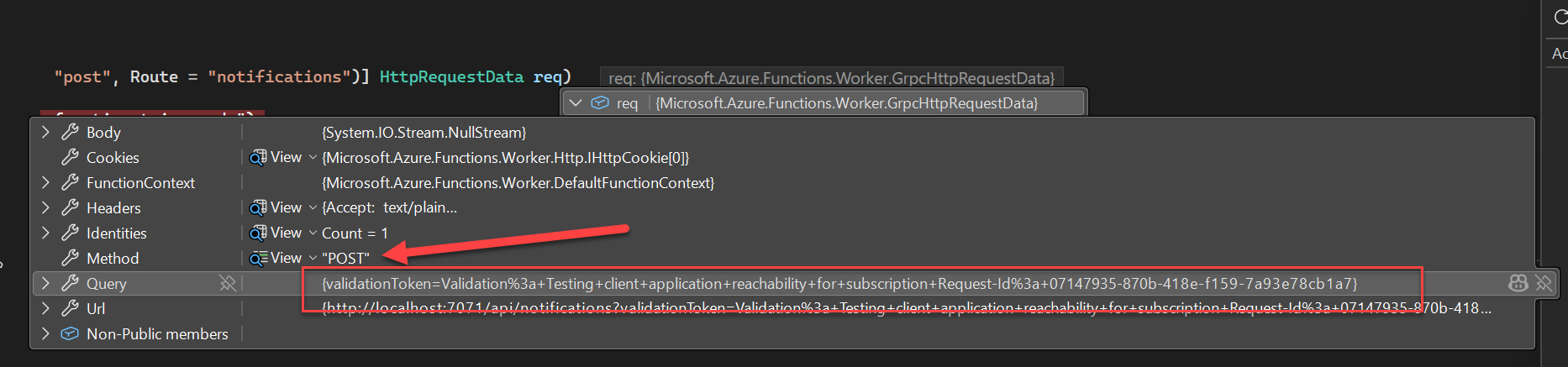
I'm sure this is just Copilot making sure we don't simply make it do our homework for us - always double-check what the LLM hallucinates for you :)
I'm not sure what could be the explanation otherwise, as the documentation clearly states it's a POST request.
Notes on "Resource Data"
Now, you might be tempted to add this setting to your payload when creating the subscription - because it looks pretty dang useful:
"includeResourceData": true
... which WOULD give you an encrypted payload of the actual thing changing in the library.
But unfortunately it's not available for DriveItem(s), such as documents in a Document Library. According to Copilot, it's only available per-demand for organizations vetted by Microsoft (so only for developers working in Fortune 100 companies - i.e., not to you or me), but I couldn't find any actual sources supporting this, so I suppose we can also assume it's simply not implemented yet. Change notifications with resource data — supported resources.
(and it probably will never be implemented, unless someone renames "Graph API" to "Copilot for APIs" 😉)
But don't be worried - we can always use delta query to get the changes from whatever Document Library had the latest change.
4. Querying the library
Or if you don't want to mess with persisting deltalinks (because that's what you'd need to do for each library - or each subscription), you can just get latest changes from a library and it'll probably be what you wanted (assuming you don't have many changes per second - as the Graph Change notifications will have a delay of tens of seconds to over a minute even in optimal scenarios).
You can either query the root items (with /children), or with an empty search query - neither one will return anything in the subfolders though:
GET https://graph.microsoft.com/v1.0/sites/contoso.sharepoint.com,ff3eae20-5a5d-4997-ba35-84fb004fec33,f7c842d7-5ae9-40a8-a630-cccf1570b277/drive/root/search(q='')?$orderby=lastModifiedDateTime desc&$top=5
For subfolders, you need to first flatten the whole library (unless you want to loop through all folders) - the only way to do this that I'm aware of is to request the root List of the Document Library.
GET https://graph.microsoft.com/v1.0/sites/contoso.sharepoint.com,ff3eae20-5a5d-4997-ba35-84fb004fec33,f7c842d7-5ae9-40a8-a630-cccf1570b277/drive?$select=id,name,driveType&$expand=list($select=id,name,webUrl)
And you should get a response somewhat like this:
{
    "@odata.context": "https://graph.microsoft.com/v1.0/$metadata#drives(id,name,driveType,list(id,name,webUrl))/$entity",
    "id": "b!IK4-_11al0m6NYT7AE_sM9dCyPfpWqhApjDMzxVwsndcoN4YxoC4R7Q7vJhBgeYp",
    "name": "Documents",
    "driveType": "documentLibrary",
    "[email protected]": "https://graph.microsoft.com/v1.0/$metadata#sites('contoso.sharepoint.com%2Cff3eae20-5a5d-4997-ba35-84fb004fec33%2Cf7c842d7-5ae9-40a8-a630-cccf1570b277')/drive('b%21IK4-_11al0m6NYT7AE_sM9dCyPfpWqhApjDMzxVwsndcoN4YxoC4R7Q7vJhBgeYp')/list(id,name,webUrl)/$entity",
    "list": {
        "@odata.etag": "\"18dea05c-80c6-47b8-b43b-bc984181e629,23\"",
        "id": "18dea05c-80c6-47b8-b43b-bc984181e629",
        "name": "Shared Documents",
        "webUrl": "https://contoso.sharepoint.com/sites/ProjectExample/Shared%20Documents"
    }
}
From this, you can grab the list id - and your resulting query should look somewhat like below:
GET https://graph.microsoft.com/v1.0/sites/contoso.sharepoint.com,ff3eae20-5a5d-4997-ba35-84fb004fec33,f7c842d7-5ae9-40a8-a630-cccf1570b277/lists/18dea05c-80c6-47b8-b43b-bc984181e629/items
    ?$expand=driveItem($select=id,name,lastModifiedDateTime,parentReference,folder,file)
    &$select=id,fields,webUrl
    &$orderby=fields/Modified desc
    &$top=10
And that request will give you the latest changes across the whole library:
{
    "@odata.context": "https://graph.microsoft.com/v1.0/$metadata#sites('contoso.sharepoint.com%2Cff3eae20-5a5d-4997-ba35-84fb004fec33%2Cf7c842d7-5ae9-40a8-a630-cccf1570b277')/lists('18dea05c-80c6-47b8-b43b-bc984181e629')/items(id,fields,webUrl,driveItem(id,name,lastModifiedDateTime,parentReference,folder,file))",
    "value": [
        {
            "@odata.etag": "\"faf5b77d-9f2c-4643-ad68-6180f0a54711,1\"",
            "id": "7",
            "webUrl": "https://contoso.sharepoint.com/sites/ProjectExample/Shared%20Documents/ODM-1234/receipt_bbfecd1d-c94a-4da7-a4d7-118ae6c4ba53%20(1).pdf",
            "[email protected]": "https://graph.microsoft.com/v1.0/$metadata#sites('contoso.sharepoint.com%2Cff3eae20-5a5d-4997-ba35-84fb004fec33%2Cf7c842d7-5ae9-40a8-a630-cccf1570b277')/lists('18dea05c-80c6-47b8-b43b-bc984181e629')/items('7')/driveItem(id,name,lastModifiedDateTime,parentReference,folder,file)/$entity",
            "driveItem": {
                "@odata.etag": "\"{FAF5B77D-9F2C-4643-AD68-6180F0A54711},1\"",
                "id": "01WU6VQVD5W727ULE7INDK22DBQDYKKRYR",
                "lastModifiedDateTime": "2026-02-21T08:11:59Z",
                "name": "receipt_bbfecd1d-c94a-4da7-a4d7-118ae6c4ba53.pdf",
                "parentReference": {
                    "driveType": "documentLibrary",
                    "driveId": "b!IK4-_11al0m6NYT7AE_sM9dCyPfpWqhApjDMzxVwsndcoN4YxoC4R7Q7vJhBgeYp",
                    "id": "01WU6VQVA35DGCS5XZVZFJW44PQL2JWCW4",
                    "name": "ODM-1234",
                    "path": "/drives/b!IK4-_11al0m6NYT7AE_sM9dCyPfpWqhApjDMzxVwsndcoN4YxoC4R7Q7vJhBgeYp/root:/ODM-1234",
                    "siteId": "ff3eae20-5a5d-4997-ba35-84fb004fec33"
                },
                "file": {
                    "mimeType": "application/pdf",
                    "hashes": {
                        "quickXorHash": "NwqDXQJVBV8rSFObla5OtqNQTsE="
                    }
                }
            }
        },
        {
            "@odata.etag": "\"29cce81b-f976-4aae-9b73-8f82f49b0adc,1\"",
            "id": "6",
            "webUrl": "https://contoso.sharepoint.com/sites/ProjectExample/Shared%20Documents/ODM-1234",
            "[email protected]": "https://graph.microsoft.com/v1.0/$metadata#sites('contoso.sharepoint.com%2Cff3eae20-5a5d-4997-ba35-84fb004fec33%2Cf7c842d7-5ae9-40a8-a630-cccf1570b277')/lists('18dea05c-80c6-47b8-b43b-bc984181e629')/items('6')/driveItem(id,name,lastModifiedDateTime,parentReference,folder,file)/$entity",
            "driveItem": {
                "@odata.etag": "\"{29CCE81B-F976-4AAE-9B73-8F82F49B0ADC},1\"",
                "id": "01WU6VQVA35DGCS5XZVZFJW44PQL2JWCW4",
                "lastModifiedDateTime": "2026-02-21T08:11:36Z",
                "name": "ODM-1234",
                "parentReference": {
                    "driveType": "documentLibrary",
                    "driveId": "b!IK4-_11al0m6NYT7AE_sM9dCyPfpWqhApjDMzxVwsndcoN4YxoC4R7Q7vJhBgeYp",
                    "id": "01WU6VQVF6Y2GOVW7725BZO354PWSELRRZ",
                    "name": "Shared Documents",
                    "path": "/drives/b!IK4-_11al0m6NYT7AE_sM9dCyPfpWqhApjDMzxVwsndcoN4YxoC4R7Q7vJhBgeYp/root:",
                    "siteId": "ff3eae20-5a5d-4997-ba35-84fb004fec33"
                },
                "folder": {
                    "childCount": 1
                }
            }
        },
        // removed the rest as it's very verbose
    ]
}
And with that, you can grab the items you're interested in! Might be only the latest one, or could be another recent one
To tie things together
So, to recap real quickly:
- Create a public endpoint that can handle POST requests. If the request has a
validationToken, return the token as-is — if it doesn't, parse the body, as the body will tell you which "Drive" (Document Library) had a recent change - Request the root list of said Document Library
- Query latest changes from said list
- Handle the latest files to see if they're of interest to you
If you don't like pulling the latest changes, you can use delta query instead - but since that requires persisting the deltalinks (delta tokens), I'd say that's beyond the scope of this article :)
Comments
No comments yet.