Copilot Connectors in Microsoft Search
In this article, I will go through some of the basics of Copilot Connectors in Microsoft Search, and how to get started with them.
Background
In 2021, Microsoft took the first steps in making Microsoft Search actually have some useful functionality 😅
I'm not saying this to be overly abrasive, but to most customers, Microsoft Search was absolutely pointless until that point.
Graph Connectors made it possible to ingest (or synchronize - important later on) and crawl content from external sources into the same Microsoft 365 Substrate where the rest of the Microsoft 365 tenant's data is stored.
To curb everyone's enthusiasm, Microsoft limited the free index size to 500 items per eligible paid seat - and extra index quota was available with a pretty hefty price tag. The limit (and the associated price tag) caused a couple of integration cases I was working on with different customers to finally be canceled - or more likely, some other technology being chosen.
In 2024, Microsoft basically removed the roadblocks by increasing the free base allocation to 50 000 000 items. This matches the allocation previously available to customers with 100 000 paid seats or more - quite the increase!
Anyway - this has unlocked plenty of real-life customer cases. And every time, we run into the same issues 😅
To wrap up the history lesson, Microsoft has improved some connectors, sunset some others, and introduced new ones. And of course they have renamed the whole thing to "Copilot Connectors" - and I'm sure the admin portal for them will be renamed "Copilot for Copilot Connectors" in the near future.
The "classic" Microsoft Search Graph Connectors are now available as "Synced Connectors" (NOT Synchronized - Synced) under the new "Copilot Connectors" umbrella.
Problem(s)
Setting up the connection and schema properly, and then being able to pull the data through the Graph API can be fairly painful. Especially so if you are trying to do this for the first time ever, as the documentation is what it is.
Oh - and in this context, one integration case every 6 months is as good as doing it for the first time each time. So I'm constantly battling with it 😅
Solution
Basics
Quick tip - You can use Microsoft's convenient online tool, Graph Explorer, to investigate your data and test out the Graph API calls.
Unless someone has already consented to the required scopes (unlikely on most tenants), you will need to have an admin account that you can use to consent to a bunch of different scopes.
You'll need to consent to the following scopes:
- ExternalConnection.Read.All
- ExternalItem.Read.All (for searching for the items) OR
- ExternalConnection.ReadWrite.All (for reading the schema)
Setting up the connection
I'll breeze through this part, as the documentation is fairly good on this (although the exact details between connectors vary greatly!)
You can find it here: Prebuilt connectors overview
My examples below are from my dev tenant, and are either of type "custom" (custom-built crawler pushing data to the index) or "knowledgeBase" (external source with a built-in crawler).
Set up yours here: Copilot connectors admin
I'll assume you have already set up your connection, and that it is in a "ready" state (meaning that your crawl is done and the index is ready to be queried).
At the end of the day, your schema should look SOMEWHAT like mine, below:
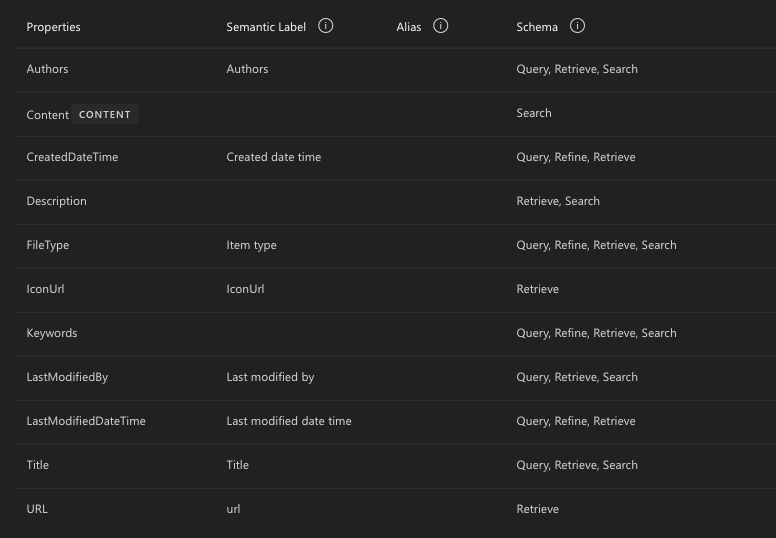
Pull configured connections using the Graph API
First, we'll pull the list of configured connections using the Graph API. You can do this with a simple GET request to the following endpoint:
GET https://graph.microsoft.com/v1.0/external/connections
This will return something like this:
{
    "@odata.context": "https://graph.microsoft.com/v1.0/$metadata#connections",
    "@microsoft.graph.tips": "Use $select to choose only the properties your app needs, as this can lead to performance improvements. For example: GET external/connections?$select=activitySettings,configuration",
    "value": [
        {
            "id": "roadmapmicrosoft365",
            "name": "Microsoft 365 Roadmap",
            "description": "Microsoft 365 Roadmap provides features and latest updates on Microsoft 365 productivity apps and intelligent cloud services. It provides estimated release dates and descriptions for Microsoft 365 features.",
            "connectorId": null,
            "state": "ready",
            "contentCategory": "uncategorized",
            "searchSettings": null,
            "activitySettings": null,
            "configuration": {
                "authorizedApps": [
                    "82778f6a-c362-4794-a1e2-76963803ccf2"
                ],
                "authorizedAppIds": [
                    "82778f6a-c362-4794-a1e2-76963803ccf2"
                ]
            }
        },
        {
            "id": "LearningAppConnectorV9",
            "name": "Learning Application Search Connector",
            "description": "Viva Learning offers a curated collection of videos, courses, books, and learning paths. It includes content tailored to our internal company needs, sourced from Microsoft Learn, M365 training, and LinkedIn Learning providers. Users can access courses to enhance their skills and knowledge.",
            "connectorId": null,
            "state": "ready",
            "contentCategory": "uncategorized",
            "searchSettings": null,
            "activitySettings": null,
            "configuration": {
                "authorizedApps": [
                    "2c9e12e5-a56c-4ba1-b768-7a141586c6fe"
                ],
                "authorizedAppIds": [
                    "2c9e12e5-a56c-4ba1-b768-7a141586c6fe"
                ]
            }
        },
        {
            "id": "InternalSupportTickets",
            "name": "Internal Support Tickets",
            "description": "Connection that indexes internal support tickets for Microsoft 365 Copilot.",
            "connectorId": null,
            "state": "ready",
            "contentCategory": "uncategorized",
            "searchSettings": null,
            "activitySettings": null,
            "configuration": {
                "authorizedApps": [
                    "3f1bf4bc-4925-4a52-b028-0dcc0c990f8e"
                ],
                "authorizedAppIds": [
                    "3f1bf4bc-4925-4a52-b028-0dcc0c990f8e"
                ]
            }
        },
        {
            "id": "IntranetSitesCloud1",
            "name": "IntranetSitesCloud1",
            "description": "Connection that indexes intranet sites for Microsoft 365 Copilot.",
            "connectorId": null,
            "state": "ready",
            "contentCategory": "knowledgeBase",
            "searchSettings": null,
            "activitySettings": null,
            "configuration": {
                "authorizedApps": [
                    "56c1da01-2129-48f7-9355-af6d59d42766"
                ],
                "authorizedAppIds": [
                    "56c1da01-2129-48f7-9355-af6d59d42766"
                ]
            }
        }
    ]
}
Figuring out the schema for a connection
GET https://graph.microsoft.com/v1.0/external/connections/IntranetSitesCloud1/schema
This will return something like:
{
    "@odata.context": "https://graph.microsoft.com/v1.0/$metadata#external/connections('IntranetSitesCloud1')/schema/$entity",
    "@microsoft.graph.tips": "Use $select to choose only the properties your app needs, as this can lead to performance improvements. For example: GET external/connections('<key>')/schema?$select=baseType,properties",
    "baseType": "microsoft.graph.externalItem",
    "properties": [
        {
            "name": "URL",
            "type": "string",
            "isSearchable": false,
            "isRetrievable": true,
            "isQueryable": false,
            "isRefinable": false,
            "aliases": [],
            "labels": [
                "url"
            ],
            "description": null
        },
        {
            "name": "Content",
            "type": "string",
            "isSearchable": true,
            "isRetrievable": false,
            "isQueryable": false,
            "isRefinable": false,
            "aliases": [],
            "labels": [],
            "description": null
        },
        {
            "name": "Title",
            "type": "string",
            "isSearchable": true,
            "isRetrievable": true,
            "isQueryable": true,
            "isRefinable": false,
            "aliases": [],
            "labels": [
                "title"
            ],
            "description": null
        },
        {
            "name": "Description",
            "type": "string",
            "isSearchable": true,
            "isRetrievable": true,
            "isQueryable": false,
            "isRefinable": false,
            "aliases": [],
            "labels": [],
            "description": null
        },
        {
            "name": "Keywords",
            "type": "string",
            "isSearchable": true,
            "isRetrievable": true,
            "isQueryable": true,
            "isRefinable": true,
            "aliases": [],
            "labels": [],
            "description": null
        },
        {
            "name": "FileType",
            "type": "string",
            "isSearchable": true,
            "isRetrievable": true,
            "isQueryable": true,
            "isRefinable": true,
            "aliases": [],
            "labels": [
                "unknownFutureValue"
            ],
            "description": null
        },
        {
            "name": "IconUrl",
            "type": "string",
            "isSearchable": false,
            "isRetrievable": true,
            "isQueryable": false,
            "isRefinable": false,
            "aliases": [],
            "labels": [
                "unknownFutureValue"
            ],
            "description": null
        },
        {
            "name": "LastModifiedDateTime",
            "type": "dateTime",
            "isSearchable": false,
            "isRetrievable": true,
            "isQueryable": true,
            "isRefinable": true,
            "aliases": [],
            "labels": [
                "lastModifiedDateTime"
            ],
            "description": null
        },
        {
            "name": "Authors",
            "type": "stringCollection",
            "isSearchable": true,
            "isRetrievable": true,
            "isQueryable": true,
            "isRefinable": false,
            "aliases": [],
            "labels": [
                "authors"
            ],
            "description": null
        },
        {
            "name": "LastModifiedBy",
            "type": "string",
            "isSearchable": true,
            "isRetrievable": true,
            "isQueryable": true,
            "isRefinable": false,
            "aliases": [],
            "labels": [
                "lastModifiedBy"
            ],
            "description": null
        },
        {
            "name": "CreatedDateTime",
            "type": "dateTime",
            "isSearchable": false,
            "isRetrievable": true,
            "isQueryable": true,
            "isRefinable": true,
            "aliases": [],
            "labels": [
                "createdDateTime"
            ],
            "description": null
        }
    ]
}
Pull data from the connection
POST https://graph.microsoft.com/v1.0/search/query
Your query string can be a word, multiple words (will be treated as OR match by default), a phrase (enclosed in single quotes), or even KQL if you actually know what you're doing!
{
  "requests": [
    {
      "entityTypes": [
        "externalItem"
      ],
      "contentSources": [
          "/external/connections/IntranetSitesCloud1"
      ],
      "query": {
        "queryString": "'web hosting'"
      },
      "from": 0,
      "size": 5,
      "fields": [
        "title",
        "URL",
        "LastModifiedDateTime"
      ]
    }
  ]
}
And the result will look somewhat like this:
{
    "value": [
        {
            "searchTerms": [
                "web",
                "hosting"
            ],
            "hitsContainers": [
                {
                    "hits": [
                        {
                            "hitId": "AAAAAAO5jbCuXFtHnP21ofAPFtEHANesJf86CehJmzbsrwm80x4AAAAAAS4AANesJf86CehJmzbsrwm80x4AAFkkjU8AAA2",
                            "contentSource": "IntranetSitesCloud1",
                            "rank": 1,
                            "summary": "<ddd/>koskila  Reading Time 9 min Word Count 1501 words  #eig #site5 #support #web-hosting<ddd/>1 in my \"One <c0>web</c0> developer's story about the downfall of <c0>web</c0> <c0>hosting</c0>\" series; a <ddd/> <c0>web</c0> <c0>hosting</c0> <ddd/>",
                            "resource": {
                                "@odata.type": "#microsoft.graph.externalConnectors.externalItem",
                                "properties": {
                                    "title": "EIG/Site5 review - Part 1, experience with Site5 before and after EIG takeover - Koskila.net",
                                    "uRL": "https://www.koskila.net/one-web-developers-story-downfall-web-hosting-eig-review/",
                                    "lastModifiedDateTime": "2026-08-17T10:21:37Z"
                                }
                            }
                        },
                        {
                            "hitId": "AAAAANDxyZeUr8RDtbjWl6nE_q8HANWgm4GDgy9Kkxzxdelkq_0AAAAAAS8AANWgm4GDgy9Kkxzxdelkq_0AAHkq5poAAA2",
                            "contentSource": "IntranetSitesCloud1",
                            "rank": 2,
                            "summary": "<ddd/>App Service Diagnostics have \"<c0>Web</c0> App Restart\" events like the below: Azure App Service <ddd/>such as file servers) <c0>hosting</c0> the <c0>website</c0> content will get rebooted, and the file volumes <ddd/>",
                            "resource": {
                                "@odata.type": "#microsoft.graph.externalConnectors.externalItem",
                                "properties": {
                                    "title": "Enabling local cache for an Azure App Service - Koskila.net",
                                    "uRL": "https://www.koskila.net/enable-local-cache-for-azure-app-service/",
                                    "lastModifiedDateTime": "2026-08-17T10:20:54Z"
                                }
                            }
                        },
                        {
                            "hitId": "AAAAADT-s5Wj4t5LtQxNP-dtQoMHAB2l3knCbtJGuPAq4-FTUfsAAAAT9z8AAB2l3knCbtJGuPAq4-FTUfsAAHjcPHMAAA2",
                            "contentSource": "IntranetSitesCloud1",
                            "rank": 3,
                            "summary": "<ddd/>needed to host a <c0>web</c0>-based thingamajiggy in WordPress and needed to include a couple of <ddd/>azurewebsites.net, or similar <c0>hosting</c0> sites - you can't (by default, anyway) load <ddd/>",
                            "resource": {
                                "@odata.type": "#microsoft.graph.externalConnectors.externalItem",
                                "properties": {
                                    "title": "How to modify CORS settings using a .htaccess file - Koskila.net",
                                    "uRL": "https://www.koskila.net/how-to-modify-cors-settings-using-a-htaccess-file/",
                                    "lastModifiedDateTime": "2026-08-17T10:21:41Z"
                                }
                            }
                        },
                        {
                            "hitId": "AAAAALqwzqN_bK1GhiyZut-T-gwHAI4EqHb2EAtMpRwOWoOK2BUAAAAAAS8AAI4EqHb2EAtMpRwOWoOK2BUAAFnE5VUAAA2",
                            "contentSource": "IntranetSitesCloud1",
                            "rank": 4,
                            "summary": "<ddd/>     HttpContext.<c0>WebSockets</c0>.IsWebSocketRequest always null in .NET Home Blog aspnetcore<ddd/>?  HttpContext.<c0>WebSockets</c0>.IsWebSocketRequest always null in .NET Core? July 27, 2021 • <ddd/>",
                            "resource": {
                                "@odata.type": "#microsoft.graph.externalConnectors.externalItem",
                                "properties": {
                                    "title": "HttpContext.WebSockets.IsWebSocketRequest always null in .NET Core? - Koskila.net",
                                    "uRL": "https://www.koskila.net/httpcontext-websockets-iswebsocketrequest-always-null-in-your-net-core-code/",
                                    "lastModifiedDateTime": "2026-08-17T10:21:21Z"
                                }
                            }
                        },
                        {
                            "hitId": "AAAAAKgT2zfnSndPjwlYe5y6EAAHAL8jjdyS8ZJAtprcTDvJ_CUAAAAAATEAAL8jjdyS8ZJAtprcTDvJ_CUAAFpbuOEAAA2",
                            "contentSource": "IntranetSitesCloud1",
                            "rank": 5,
                            "summary": "<ddd/>your ASP.NET Core <c0>web</c0> application to an Azure App Service? Yeah, me too. And when it's a <ddd/>bitness.   Make sure your <c0>hosting</c0> model is the correct one Okay, so enabling InProcess <ddd/>",
                            "resource": {
                                "@odata.type": "#microsoft.graph.externalConnectors.externalItem",
                                "properties": {
                                    "title": "How to fix \"HTTP Error 500.32 - ANCM Failed to Load dll\" - Koskila.net",
                                    "uRL": "https://www.koskila.net/how-to-fix-http-error-500-32-ancm-failed-to-load-dll/",
                                    "lastModifiedDateTime": "2026-08-17T10:20:50Z"
                                }
                            }
                        }
                    ],
                    "total": 26,
                    "moreResultsAvailable": true
                }
            ]
        }
    ],
    "@odata.context": "https://graph.microsoft.com/v1.0/$metadata#Collection(microsoft.graph.searchResponse)"
}
Note, that if you then parse the results into JSON, the actual properties you requested will be available under the resource.properties object.
If in your query you requested LastModifiedDateTime and URL (like I did in the POST request), you'll get them back in whatever casing Microsoft Search has decided to use for the property names. In my case, it was lastModifiedDateTime and uRL. So be careful when parsing the results.
You can only get values for properties that have been defined as "Retrieve" in the search schema, but you can search on any property that has been defined as "Search" in the search schema. And in Summary, it looks like you'll get primarily excerpts from the "Content" property.
What about that /items endpoint?
There is a publicly listed, documented endpoint at https://graph.microsoft.com/v1.0/external/connections/<connection-id>/items/
I've never seen it work on customer tenants, nor my dev tenant.
It always returns an error like this:
{
    "error": {
        "code": "UnknownError",
        "message": "",
        "innerError": {
            "date": "2026-08-18T07:26:13",
            "request-id": "1b702aa4-588e-4add-a3ef-4406449a5680",
            "client-request-id": "c85c7608-3308-af69-9e49-8c334cd23064"
        }
    }
}
Copilot was helpful enough to tell me that the reason is that the endpoint is an "External Graph Connector" and not a "Synced Copilot Connector" - but that's nonsense. We already know those are the same thing.
What could be the reason is that the endpoint only works for some connector types, and neither the "custom" nor the "knowledgeBase" connector types I've ever worked with support it.
But I haven't really needed to use it, either, as the search endpoint has been enough.
If it works for you, let me know.
Comments
No comments yet.